scale(0.121094) translate(0 512) scale(1 -1)' d='M85 384H469V427H85C62 427 43 407 43 384V149H0V85H299V149H85V384ZM491 341H363C351 341 341 332 341 320V107C341 95 351 85 363 85H491C502 85 512 95 512 107V320C512 332 502 341 491 341ZM469 149H384V299H469V149Z'/%3E%3C/svg%3E)
 scale(0.121094) translate(0 512) scale(1 -1)' d='M341 491H171C135 491 107 462 107 427V85C107 50 135 21 171 21H341C377 21 405 50 405 85V427C405 462 377 491 341 491ZM363 128H149V427H363V128ZM299 64H213V85H299V64Z'/%3E%3C/svg%3E)
 scale(0.121094) translate(0 512) scale(1 -1)' d='M363 490 149 491C126 491 107 471 107 448V64C107 41 126 21 149 21H363C386 21 405 41 405 64V448C405 471 386 490 363 490ZM363 107H149V405H363V107Z'/%3E%3C/svg%3E)
 scale(0.121094) translate(0 512) scale(1 -1)' d='M256 448C150 448 64 362 64 256V107C64 83 83 64 107 64H192V235H107V256C107 339 173 405 256 405C339 405 405 339 405 256V235H320V64H405C429 64 448 83 448 107V256C448 362 362 448 256 448ZM149 192V107H107V192H149ZM405 107H363V192H405V107Z'/%3E%3C/svg%3E)
 scale(0.121094) translate(0 512) scale(1 -1)' d='M427 128C450 128 469 147 469 171V384C469 407 450 427 427 427H85C62 427 43 407 43 384V171C43 147 62 128 85 128H0V85H512V128H427ZM85 384H427V171H85V384Z'/%3E%3C/svg%3E)
 scale(0.121094) translate(0 512) scale(1 -1)' d='M424 283C426 274 427 265 427 256C427 162 350 85 256 85C162 85 85 162 85 256C85 257 86 258 85 259C141 280 185 323 208 377C280 289 378 298 400 300L381 342C378 341 282 333 227 424C249 427 264 427 283 424C336 449 324 443 342 451C315 463 287 469 256 469C138 469 43 374 43 256C43 138 138 43 256 43C374 43 469 138 469 256C469 287 463 315 451 342L424 283ZM172 405C159 364 131 331 94 310C108 350 136 384 172 405ZM293 235C293 249 305 261 320 261C335 261 347 249 347 235C347 220 335 208 320 208C305 208 293 220 293 235ZM165 235C165 249 177 261 192 261C207 261 219 249 219 235C219 220 207 208 192 208C177 208 165 220 165 235ZM491 416 439 439 416 491 393 439 341 416 393 393 416 341 439 393 491 416Z'/%3E%3C/svg%3E)
 scale(0.121094) translate(0 512) scale(1 -1)' d='M461 124 277 261V281C313 291 337 327 329 367C324 395 301 418 273 425C225 436 181 399 181 352H224C224 370 238 384 256 384C274 384 288 370 288 352C288 334 273 320 255 320C244 320 235 310 235 299V261L51 124C35 111 44 85 64 85H448C468 85 477 111 461 124ZM128 128 256 224 384 128H128Z'/%3E%3C/svg%3E)
 scale(0.121094) translate(0 512) scale(1 -1)' d='M427 341V384C427 419 398 448 363 448H149C114 448 85 419 85 384V341C50 341 21 313 21 277V171C21 135 50 107 85 107V85C85 74 95 64 107 64C118 64 128 74 128 85V107H384V85C384 74 394 64 405 64C417 64 427 74 427 85V107C462 107 491 135 491 171V277C491 313 462 341 427 341ZM128 384C128 396 138 405 149 405H363C374 405 384 396 384 384V325C371 313 363 296 363 277V235H149V277C149 296 141 313 128 325V384ZM448 171C448 159 438 149 427 149H85C74 149 64 159 64 171V277C64 289 74 299 85 299C97 299 107 289 107 277V192H405V277C405 289 415 299 427 299C438 299 448 289 448 277V171Z'/%3E%3C/svg%3E)
 scale(0.121094) translate(0 512) scale(1 -1)' d='M171 405H213V341H171V405ZM171 256H213V149H171V256ZM384 469H128C105 469 85 450 85 427V85C85 62 105 43 128 43H384C407 43 427 62 427 85V427C427 450 407 469 384 469ZM384 85H128V278H384V85ZM384 320H128V427H384V320Z'/%3E%3C/svg%3E)
 scale(0.121094) translate(0 512) scale(1 -1)' d='M277 469V299H448C448 393 372 469 277 469ZM320 341V419C356 407 385 378 398 341H320ZM137 277 117 320H43V277H90C90 277 130 191 135 183C112 170 96 146 96 117C96 76 129 43 171 43C208 43 239 70 244 107H289C294 70 325 43 363 43C404 43 437 76 437 117C437 140 428 159 412 173C435 202 448 238 448 277H137ZM171 85C153 85 139 100 139 117C139 135 153 149 171 149C188 149 203 135 203 117C203 100 188 85 171 85ZM363 85C345 85 331 100 331 117C331 135 345 149 363 149C380 149 395 135 395 117C395 100 380 85 363 85ZM378 199 372 191C369 192 366 192 363 192C333 192 307 175 295 149H238C227 172 206 188 181 191L172 206C169 209 164 220 157 235H398C394 222 387 210 378 199Z'/%3E%3C/svg%3E)
 scale(0.121094) translate(0 512) scale(1 -1)' d='M149 128C126 128 107 109 107 85C107 62 126 43 149 43C173 43 192 62 192 85C192 109 173 128 149 128ZM363 128C339 128 320 109 320 85C320 62 339 43 363 43C386 43 405 62 405 85C405 109 386 128 363 128ZM332 235C348 235 362 243 369 257L445 395C453 409 443 427 427 427H111L91 469H21V427H64L141 265L112 213C96 184 117 149 149 149H405V192H149L173 235H332ZM131 384H391L332 277H182L131 384Z'/%3E%3C/svg%3E)
 scale(0.121094) translate(0 512) scale(1 -1)' d='M256 469C138 469 43 374 43 256C43 138 138 43 256 43C374 43 469 138 469 256C469 374 374 469 256 469ZM277 399 306 419C345 407 378 382 400 348L391 319L362 310L277 369V399ZM206 419 235 399V369L150 310L121 319L112 348C134 381 167 407 206 419ZM151 147 127 145C101 175 85 214 85 256C85 259 86 261 86 263L107 279L137 269L168 176L151 147ZM309 94C292 89 275 85 256 85C237 85 220 89 203 94L188 126L202 149H311L324 126L309 94ZM304 192H208L179 278L256 332L333 278L304 192ZM385 145 361 147 344 176 375 269 405 279 426 263C426 261 427 259 427 256C427 214 411 175 385 145Z'/%3E%3C/svg%3E)

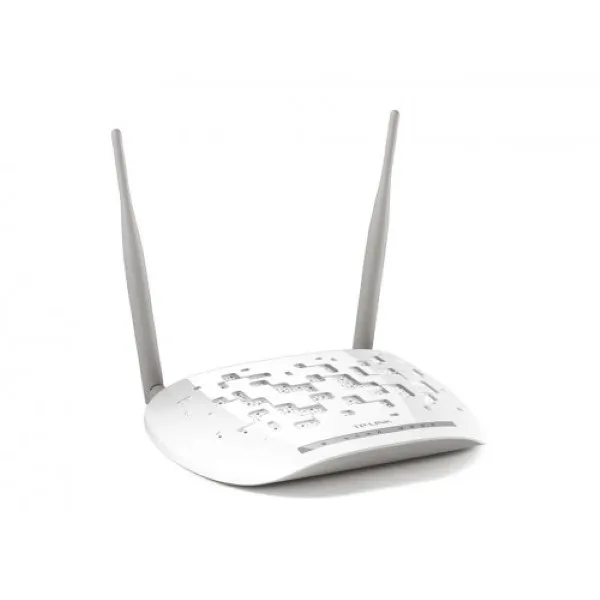
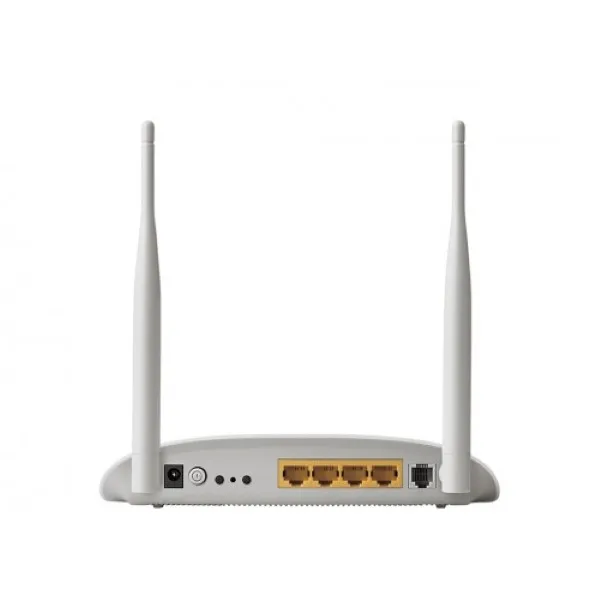
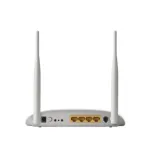
 TP-Link TD-W8961ND 300 MBPS WIRELESS & ADSL 2 + ROUTER
TP-Link TD-W8961ND 300 MBPS WIRELESS & ADSL 2 + ROUTER
The TP-Link TD-W8961ND is a high-performance 300 Mbps wireless and ADSL2+ router, offering robust connectivity and speed.
Specifications
· Product Type: ADSL2+ Modem Router
· Brand: TP-Link
· Model: TD-W8961ND
· Antenna Omni directional, Detachable, Reverse SMA
· Frequency 2.400-2.4835GHz
· 1 WPS Button
· Wireless Speed: Up to 300 Mbps
· Frequency Range: 2.4 - 2.484 GHz
· ADSL Standards: ADSL, ADSL2, ADSL2+
· Interface: 4 10/100Mbps RJ45 Ports, 1 RJ11 Port
· Antenna Type: 2 Detachable Omni-Directional Antennas
· Security: NAT Firewall, SPI Firewall, MAC / IP / Packet / Application / URL Filtering, Denial of Service(DoS), SYN Flooding, Ping of Death
· System Requirements: Microsoft® Windows® 98SE, NT, 2000, XP, Vista™ or Windows 7, MAC® OS, NetWare®, UNIX® or Linux
Key Features
· High Speed: Offers a speedy 300Mbps wireless transmission rate ideal for online gaming, internet calling and even HD video streaming.
· 2-in-1 Device: ADSL2+ Modem and Wireless N Router combined in a single device reduces clutter and simplifies setup.
· Wide Coverage: Two detachable Omni-directional antennas provide superior coverage and reliability.
· Advanced Security: Comprehensive security features including NAT and SPI firewalls, MAC, IP, Packet, and URL filtering, and protection against DoS attacks.
· QoS Support: Quality of Service (QoS) support ensures smoother performance for critical network traffic.
· IPv6 Enabled: Forward-looking IPv6 support future-proofs the router for the next generation of internet protocols.
· Port Forwarding: Supports IGMP multicast, UPnP, and port triggering for special applications.
· Easy Setup: Easy setup assistant provides a quick & hassle-free installation process.
Benefits
1. Performance: High wireless speed allows for demanding online activities such as HD video streaming, online gaming, and internet calls.
2. Security: Advanced security features offer robust protection against various cyber threats.
3. Future Proofing: With its support for IPv6, this device is prepared for the next generation of internet protocols.
4. Versatility: QoS and Port Forwarding features allow for a range of network applications and improved performance for priority traffic.
5. Ease of Use: The easy setup assistant simplifies the installation process, making this device user-friendly even for those with limited technical knowledge.
Product Details
Experience Seamless Connectivity in Bangladesh with TP-Link TD-W8961ND
Enhance your networking endeavors with the TP-Link TD-W8961ND 300 Mbps Wireless & ADSL 2+ Router. Crafted to deliver exceptional performance, this router is the key to accessing high-speed internet and ensuring steadfast connectivity.
Fast and Reliable
Indulge in lightning-speed internet, reaching an astounding 300 Mbps, guaranteeing seamless surfing, streaming, and gaming pleasure. The TP-Link TD-W8961ND is meticulously crafted to furnish unwavering and trustworthy connectivity, adeptly catering to the requisites of contemporary digital living.
Versatile ADSL Router
Tailored to cater to your internet connection, the TP-Link TD-W8961ND operates as an ADSL 2+ router. It ensures smooth data transmission over ADSL lines, offering a seamless online experience.
Effortless Setup and Troubleshooting
Creating your network with the TP-Link TD-W8961ND is remarkably simple. Our straightforward setup instructions guarantee a swift and trouble-free installation. If any problems crop up, the router's troubleshooting features facilitate efficient and uncomplicated issue resolution.
Competitive Pricing in Bangladesh
Explore the TP-Link TD-W8961ND's pricing in Bangladesh to find a high-performance router that meets your budget without sacrificing quality.
Optimized for Your Devices
Unearth a router that effortlessly blends with your gadgets. The TP-Link TD-W8961ND is harmonious with various devices, delivering a unified experience throughout your smart home setup.
Firmware Updates for Peak Performance
Keep up-to-date with the newest functionalities and security improvements. Consistent firmware updates maintain the peak performance of your TP-Link TD-W8961ND router, guaranteeing a steadfast and protected internet link.
Comprehensive User Manual
Delve into the rich capabilities of your router through the extensive TP-Link TD-W8961ND guide. Gain in-depth knowledge about advanced configurations, personalized adjustments, and strategies to optimize your network's efficiency.
What is the price of TP-Link TD-W8961ND 300 MBPS WIRELESS & ADSL 2 + ROUTER in Bangladesh?
The latest price of TP-Link TD-W8961ND 300 MBPS WIRELESS & ADSL 2 + ROUTER in Bangladesh is ৳1,900. The regular price is ৳2,250. The price shown on this page is the current price. You can order it online from Smart Deal with delivery across Bangladesh.
Is TP-Link TD-W8961ND 300 MBPS WIRELESS & ADSL 2 + ROUTER in stock?
Yes, TP-Link TD-W8961ND 300 MBPS WIRELESS & ADSL 2 + ROUTER is currently in stock at Smart Deal and you can order it now.
Reviews & Ratings
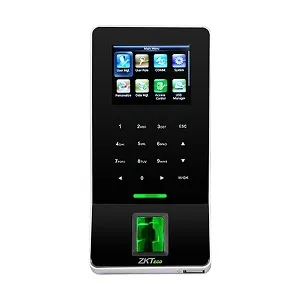
ZKTeco F22 Fingerprint Time Attendance and Access Control Terminal without Adapter
 Continue with Google
 Continue with Facebook